
WinMix. Active Raw Materials — Total Raw Material Requirements
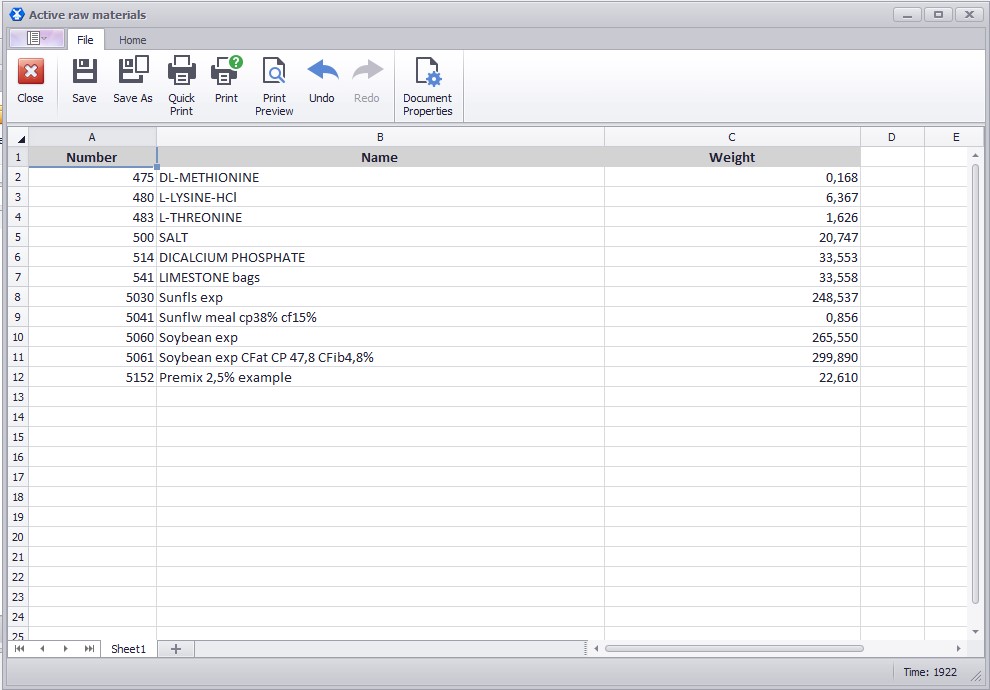
The updated Active Raw Materials function collects all the raw materials from the selected recipes into one report and calculates the total raw material requirement for the planned production volume.
How it works:
- Open the recipe list.
- Select one or more recipes, although the function is most useful for two or more.
- Go to Tools and click Active Raw Materials.
- In the window that appears, you will see the selected recipes.
- Enter the production weight for each recipe, for example 1000 kg for one and 900 kg for another.
- Based on these values, the program will calculate how much of each raw material is needed in total.
- Click OK.
- In the resulting report, you will see all the raw materials from the selected recipes in one list. If the same raw material appears in several recipes, it is not duplicated — its quantity is summed up.
Note: this report does not include client raw materials, but it does include marked ones.
Changing the weight later: go to View → Details. Select only one recipe and change the weight for each recipe separately.
📹 Video tutorial: